![Halda Logo Black Tight-2.svg]](https://info.halda.io/hubfs/Halda%20Logo%20Black%20Tight-2.svg)
How many forms can we create, and can the same form be used in multiple places?
There is no form limit with your Halda subscription. A single Halda form can be published to a single URL or several URLs across your website. As long as the Halda script is present on the webpage, you can opt to publish an AI Form there.
How do we decide what a form should be about and which pages should have a form?
Your Account Manager will work with you to strategically place Halda's AI Forms on your website. Our Website Coverage tool highlights pages with high traffic that are not being targeted by a Halda form to help inform you on missed opportunities for conversion.
What publishing options are available?
Publishing settings are found inside the AI Form editor. This is where you will be able to see the different publishing options available. This includes URLs where the form will show, selecting actions to trigger a form showing, and the frequency the form displays. Other publishing options include geo-targeting and campaign targeting.
Can we have multiple forms on the same page, and what happens if we do?
While you are able to publish multiple forms to a single URL, it is important to note that if all forms are published to show for organic traffic, only the most recently published form will show.
The most common use case for publishing multiple forms to a single page is for campaigns. We are able to use our campaign targeting to have several forms published to the same page and customize the form seen based on a users UTM parameters. This can help you target paid traffic differently than your organic traffic and serve content most relevant to your differing audiences.
What form display options and branding customizations are available?
Forms can be displayed as a Modal Medallion, Modal, or Slide Out format.
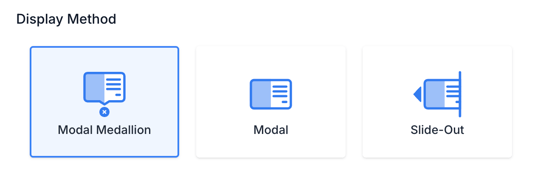 You are able to fully customize the branding on your form (colors, logos, font, etc.) to match your website brand guidelines.
Can we use conditional or skip logic in an AI Form?
Halda's AI Forms have both conditional and skip logic capabilities to help further personalize the form experience for prospective students.
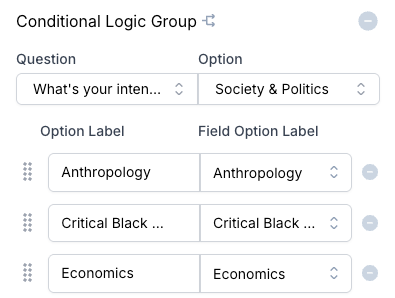
Conditional Logic Groups
- Definition: This determines which specific answer choices are shown based on a previous question.
- Example: If a user selects that they are a Computer Science major, the next question dynamically filters to show only the different emphases available for that specific major.
- Trigger Rules: This logic requires a defined, selectable value to act as a trigger. It is only compatible with Radio Button, Dropdown, and List question types.
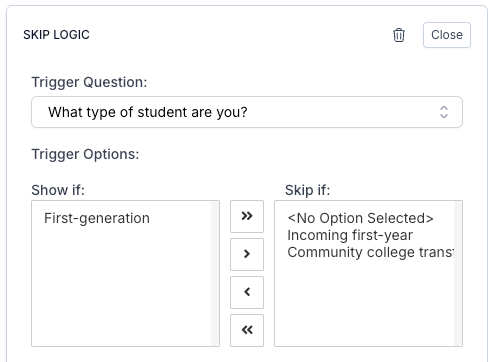
Skip Logic
- Definition: This allows the form to skip an entire question or section based on an answer.
- Example: If a question regarding documentation is only applicable to international students, the form can be set to skip that question entirely if the user identifies as a domestic student.
- Trigger Rules: Like conditional logic groups, skip logic is only compatible with Radio Button, Dropdown, and List question types. Anything that is a form of free response (like Short Answer or Paragraph) is not compatible with this logic flow.
What are AI-generated response pages, and how do static, dynamic, and AI responses differ?
For more information about response types in the AI Form repose page, visit this article:
AI Form Response Types.
Where does form data go, and how quickly does it appear in our CRM?
Halda offers several integration types that allow data to directly flow from our system into your CRM. Direct integrations with Slate and Salesforce are available, while SFTP and Webhook connections can be used for other CRMs.
Upon form submission, Halda will push data immediately to Webhook and Salesforce connections. For Slate and SFTP connections, you can choose to have files sent immediately or have files dropped at certain time intervals (Hourly, Daily, etc.)
Is A/B testing available?
You are able to A/B test Halda forms to see how different questions or styles impact conversion. Your account manager will be able to help you with setting up A/B tests.
For additional questions, contact your Halda Account Manager.