![Halda Logo Black Tight-2.svg]](https://info.halda.io/hubfs/Halda%20Logo%20Black%20Tight-2.svg)
Accessing the AI SEO Dashboard
- Navigate to the left menu in your Halda dashboard.
- Scroll down to the Analytics section and select AI SEO.
- This will open the AI SEO dashboard where you can review various metrics and tools.

Understanding the Dashboard Features
- At the top of the dashboard, you’ll find tools like Filter, Search Performance, Download Report, and Edit Instructions. Note that your access to these tools may depend on your permission level.
Answered vs. Unanswered Questions
- The dashboard displays a percentage of answered versus unanswered questions. Answered questions are those where the AI provided a response, even if it might not always be 100% accurate. Unanswered questions are those where the AI couldn’t find a confident answer.
- Use this metric to gauge how well your AI is navigating your site and where it might need improvement.
Search Categories and Student Feedback
- Below the answered/unanswered metrics, you’ll see Search Categories, showing the most common topics users are inquiring about (e.g., financial aid, admissions). This helps you understand user interests and areas of frequent queries.
- Student Feedback metrics show how many users rated the AI’s responses as helpful or not helpful. You can filter by these ratings to see which answers are performing well.

Reviewing Real User Questions and AI Responses
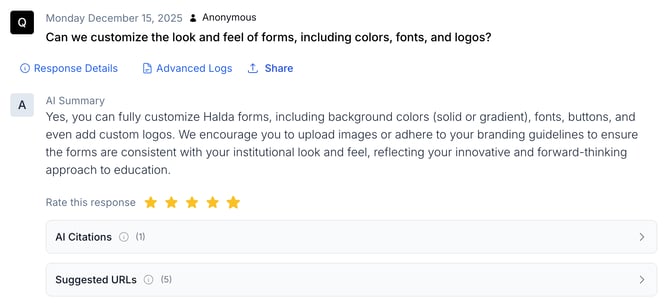
- Further down, you’ll find a list of real questions users have asked, along with the AI’s verbatim responses. This section includes the date of the query, who asked it (if known), and suggested URLs that the AI provided.
- You can rate each response on a scale of 1 to 5 and add custom AI topic instructions to improve future answers.
Editing Instructions and Analyzing Results
- Use the Edit Instructions button at the top of the dashboard to go directly to the AI Topic Instructions page. Here, you can refine the AI’s guidelines to improve its accuracy and context.
- Remember that the AI SEO dashboard is a tool for continuous improvement. Regularly review the metrics and adjust your site content or AI instructions as needed.
If you have additional questions, connect with your account manager.