![Halda Logo Black Tight-2.svg]](https://info.halda.io/hubfs/Halda%20Logo%20Black%20Tight-2.svg)
Overview
Equations in AI Forms allow you to create custom outputs based on a student’s responses—using Excel-style logic directly within the Response Page experience.
When used thoughtfully, equations help:
- Personalize responses at scale
- Apply consistent rules and thresholds
- Calculate or estimate outcomes
- Support guided decision-making
- Reduce manual follow-up
This article explains what equations are, where they fit best, and how to use them effectively.
What Are Equations?
Equations are rule-based expressions that evaluate:
- Form questions
- Selected answer options
- Numeric inputs
They return an output that can be displayed directly on the Response Page.
Equations are deterministic and predictable—they do not generate language like AI, but instead return results based strictly on defined logic.
Where Equations Appear
Equations can be added within the Form Response section and displayed:
- Above question responses
- Between content blocks
- After AI Generated Responses
- Before CTA content
They can be used with both Traditional Responses and AI Generated Responses.
Common Use Cases
Equations are most effective when outcomes must be consistent, explainable, and rules-based.
Scholarship Calculators
Use equations to estimate:
- Merit-based scholarship ranges
- Eligibility thresholds
- Award tiers based on GPA, test scores, or experience
Best practices:
- Use “may qualify” or “could be eligible” language
- Avoid guaranteeing award amounts
- Pair outputs with explanatory text or next steps
Persona Quizzes & Pathway Matching
Equations can evaluate multiple responses to:
- Identify student personas
- Recommend program tracks or pathways
- Match students to next steps based on goals or readiness
This approach works well for:
- Exploration-stage students
- Program fit assessments
- Career or outcome-based guidance
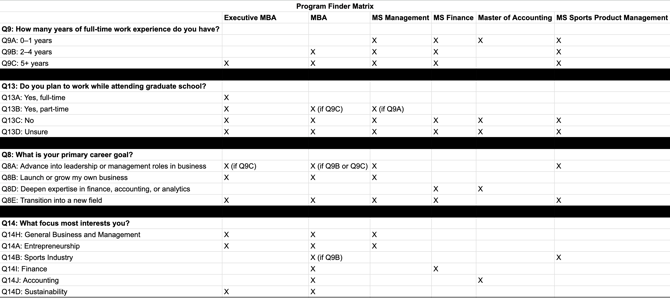
Equations handle the scoring logic using a matrix like this:
Custom Response Styling
Equation outputs support HTML and inline CSS, allowing you to:
- Highlight key results visually
- Display boxed or branded messages
- Draw attention to important outcomes
Common examples:
- Scholarship results displayed in a styled container
- Eligibility messages with colored borders or backgrounds
- Tier-based messaging with visual hierarchy
Styling should reinforce clarity, not distract from the message.
When Not to Use Equations
Avoid equations when:
- Logic becomes overly complex
- Results could confuse or discourage students
- Decisions require discretion or review
- A conversational explanation is more appropriate
If the logic cannot be explained simply, consider using AI or static content instead.
Building an Equation
Equations use Excel-like logic to evaluate inputs and return outputs.
Inputs Can Include
- Multiple-choice selections
- Numeric values (e.g., GPA, years of experience)
- Boolean responses (Yes / No)
- Combined conditions across multiple questions
Outputs Can Be
- Text messages
- Calculated values
- Eligibility indicators
- Styled HTML content
Best Practices for Equation Design
Keep Logic Simple
- Minimize nested conditions
- Break complex logic into multiple equations
- Name equations clearly for maintainability
Write Outputs for Students
Equations should explain what the result means, not how it was calculated.
Avoid: “Condition A and B were met.”
Prefer: “Based on your responses, you may qualify for additional support options.”
Do not use equations to:
- Make admissions decisions
- Guarantee scholarships or awards
- Promise outcomes
Use qualifying language:
- “May qualify”
- “Could be eligible”
- “Based on the information provided”
Pair Equations with Context
Equations work best when paired with:
- A short explanatory text area
- A clear CTA
- AI Search for follow-up questions
Never leave students wondering why they received a result.
Styling Equation Outputs
Equation outputs support HTML and inline CSS, enabling:
- Brand-aligned formatting
- Visual emphasis
- Improved scannability
Styling Best Practices
- Use color sparingly
- Maintain accessibility and contrast
- Keep layouts clean and readable
Testing Your Equations
Before publishing:
- Test all answer combinations
- Validate edge cases
- Confirm mobile and desktop display
- Ensure logic matches institutional rules
Equations should behave predictably every time.
Combining Equations with AI Responses
Equations and AI are most powerful together:
- Equations handle rules, scoring, and thresholds
- AI explains meaning, provides reassurance, and guides next steps
This hybrid approach balances precision with personalization.
Common Mistakes to Avoid
- Overly complex logic
- Exposing internal calculations to students
- Using equations where AI would be clearer
- Forgetting to explain results
- Skipping testing for less common paths
Final Thought
Equations are a powerful tool when used with intention and restraint.
When logic is simple, outputs are clear, and context is provided, equations enhance trust and confidence—without replacing human judgment.
If you need help designing scholarship calculators, persona quizzes, or styled equation outputs, reach out to your Account Manager.